I made a Spider-Man VSCode extension
I spend most of my working day staring at VSCode, and after a while it can get pretty boring to look at (especially when copilot does most of your job). I've seen a few extensions which try to make the editor a bit more interesting, especially ones designed to give you something visual to look at while working. VSCode Pets was probably the biggest inspiration for this. I liked the idea, but I wanted to fill out the sidebar with other things too.
Spider-Man is one of my biggest interests, so naturally I decided that having him swing around my editor was the solution. I also wanted a small retro city running in the sidebar with Spider-Man swinging through it while I worked. There wasn't really a productivity benefit or any particular problem I was trying to solve. I just thought it would look cool, and I'd never made a VSCode extension before either.
I should probably also make it clear that this is staying as a personal extension. Using Spider-Man makes releasing it publicly pretty much impossible, and I don't particularly feel like finding out how quickly Marvel's lawyers can find my email address. For me, it was always meant to be a small project that made my own editor more interesting.
Making a VSCode extension
I went into this without knowing anything about how VSCode extensions worked. Luckily, VSCode is built with customisation in mind and Microsoft provides an entire Extension API for adding things to the editor. Once I started going through the documentation, it became pretty clear that VSCode gives developers a lot of control over the editor without needing to modify VSCode itself.
The basic structure wasn't too difficult to understand either. The package.json file defines information about the extension and what it contributes to VSCode, while extension.ts contains the actual extension code and an activate() function which runs when the extension is activated. For my extension, I registered a WebviewViewProvider, which allowed me to create a custom view and control what gets rendered inside it.
vscode.window.registerWebviewViewProvider(
    'retroSwinger.view',
    provider,
    { webviewOptions: { retainContextWhenHidden: true } }
);
The webview ended up being perfect for what I wanted to build. It essentially gave me a custom area inside VSCode where I could render HTML, CSS, and JavaScript. After getting the extension running, most of the visual work felt like normal web development, which was a nice callback to my early frontend developer days. I liked how easy Microsoft has made this kind of customisation for developers, since there wasn't much VSCode specific code required before I could start working on the actual idea.
Getting Spider-Man on the screen
Before making anything move, I had to decide where the extension was actually going to live. I considered putting it around the terminal area at the bottom of VSCode, but I wanted something that could stay visible without getting in the way of the code I was writing. The Explorer sidebar made more sense because I could give the animation its own view and leave it running beside the editor.
I also knew from the beginning that I wanted everything to have a retro aesthetic. There wasn't much point trying to create a highly detailed Spider-Man when he would spend most of his time as a tiny character swinging around a relatively small part of the screen. Keeping him simple also made the animation fit better with the rest of the environment. The buildings followed the same idea, with simple shapes and enough detail to make the scene look like a city without becoming distracting.
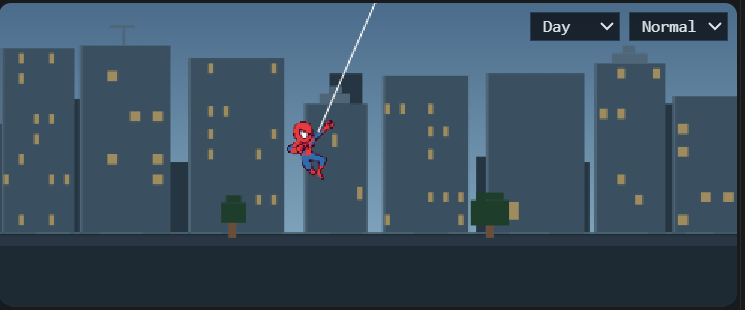
Once the character, buildings and web were on the screen, I had something that technically looked like the extension I imagined. The next problem was making Spider-Man move in a way that actually resembled swinging. Moving a character across the screen is pretty easy, but making that movement feel believable ended up requiring a bit more work.
Making the swinging feel right
My first attempts could make Spider-Man swing, but he wasn't really going anywhere. He would move backwards and forwards around roughly the same area, which made him look more like a pendulum than Spider-Man travelling through a city. Simply combining horizontal movement with an up and down animation didn't look much better either.
I ended up having to think about some basic physics. The position of the web anchor, web length, swing angle, velocity, gravity and momentum all affected how the animation looked. Spider-Man needed to accelerate as he moved towards the bottom of the swing and carry that momentum as he moved forward. Even though the animation is deliberately retro and isn't trying to be a realistic simulation, getting those relationships reasonably close made a massive visual difference.
Releasing the web was another important part of it. Spider-Man needed to keep travelling forward after letting go, then attach to another point and begin the next swing rather than snapping between positions. Once this started working, it finally looked like he was travelling through the city instead of swinging from the same piece of string forever. The physics didn't need to be perfect, but they needed to be convincing enough that the movement looked natural.
Getting it to actually work
Getting Spider-Man to swing was surprisingly easy. Getting him to swing in a way that didn't look terrible took most of the development time. There were heaps of versions that technically worked, but small problems became really obvious when the animation was sitting beside me and repeating constantly. At one point he was barely moving forward while the buildings continued travelling past him, which made it look like the entire city was moving instead.
The fact that the animation needed to run forever also made things more complicated. A single good looking swing wasn't enough because Spider-Man eventually had to leave the screen, reset and start again without the loop being too obvious. Small changes to the timing, momentum, web attachment points, building movement and overall animation speed made a surprisingly large difference. A lot of the development process ended up being watching the same animation repeatedly, noticing something slightly wrong, changing a value, and then watching it again.
The polishing ended up taking considerably longer than building the extension or getting the first version of the animation working. It also made me think more about performance because this is something I want running continuously while I'm actually coding. Making VSCode slower because I wanted Spider-Man swinging beside my code would be pretty counterproductive. Eventually I got it to a point where the loop looked natural enough, the movement felt consistent and I could leave it running without constantly noticing something that needed fixing.
Future changes
There's still quite a lot I want to add to the extension. I want more variety in the buildings, different swing patterns, proper web attachment points, release timings, poses, and some more improvements to the physics while keeping the same retro style. I'd also like to add some customisation and eventually have Spider-Man react to things happening inside VSCode rather than having the animation be completely separate from what I'm doing. One idea I particularly like is listening for build failures and having Spider-Man lose his web and fall straight into the ground whenever my code fails to build, with successful builds potentially triggering their own animation as well. There's a lot I could add from here, but I still want to keep it as a fun background extension rather than turning something I made for myself into a massive project.
My take
This was probably one of the most fun projects I've made. I started because I wanted Spider-Man swinging around VSCode and ended up learning how the VSCode Extension API works, how webviews can be integrated into the editor, and a surprising amount about browser animation and basic physics. None of those were things I specifically set out to learn when I started. This extension in general probably won't make me any more productive, but at least now I can watch Spider-Man swing around while pretending to be productive.